So I spent the last few days at the annual FETC (Florida Education Technology Conference) like I do most years. As I was walking the exhibit hall floor I came across a neat find from the textbook company Houghton Mifflin Harcourt. They have teamed up with Nintendo Wii to bring back the Carmen Sandiego games! They are (for now at least) available only in Wiiware (the wireless area from the Wii console). They are 600 points (about 6 bucks) and are aligned to the common core standards. The content is Math based, but if you are following the new standards you know that there are other concepts involved in each subject. You can find more information at hmheducation.com/games. Check it out and tell me what you think!
And, if anybody from Houghton Mifflin Harcourt is reading this post, let's talk about other games that can be used in the classroom!
Showing posts with label Wii. Show all posts
Showing posts with label Wii. Show all posts
Sunday, January 29, 2012

Tuesday, December 6, 2011
a little teaser
Nicole and I have been talking about some new games to use with the Wii. We have two new games planed with the 6th grades and one different game (new game but same math practice) with the 4th grades. You will have to check back with me next week to see how it goes! I will give you a hint - swish, swish, swish (and it's not basketball)! See you next week!
Tuesday, November 15, 2011
Playing Wii with the 6th grade

Nicole and I meet after each class to discuss how things went. We have been excited and impressed with the students work and how smoothly the whole process has been. So, with our discussions, we decided to open the Wii up to the 6th graders as well. Nicole wanted to play Brain Age with these students so we could review negative and positive integers.
Before class started I came in and created an account for the 6th grade. I also went through all the opening screens (there are a few with this game) and went to the correct spot- Practice, Compute, Balloon Pop, and Hard Level (so there would be negative numbers). During the game numbers come up on the screen (between 5 and 6 of them). The balloons are all different shapes, sizes, colors and they move (revolve and shake) around the screen. The task is simple, pop the balloons in order from lowest to highest. In the practice level you get 10 balloons to pop and see how fast you can accomplish the task. It is not all about just speed though, you have to get the correct order also! Nicole had each student do 5 balloons and then pause the game. We would then switch with the next student who would finish up that round. All of the students at their desks had to write down the smallest and the largest numbers only (and even that was difficult if somebody hit the wrong balloon too early). The students at their seats had to concentrate and pay attention to the screens to try and get the numbers. I also wrote down the numbers so Nicole would have something to compare the papers to (and even I have to say that I missed a few numbers). After the 2 students (and 10 chances) went by the game would give a brain score. Once a row was finished, Nicole took all of those scores and got an average for the row. Each row competed against each other for highest average score. Again, the students seemed to enjoy themselves and reviewed negative numbers quickly. I heard comments like "This is fun" and "This is hard" from different students during game play. Also got cheers as the students did well.
Monday, November 7, 2011
Decimal subtraction and yards to feet conversion

So, since our first day of Wii game play on Halloween Nicole has given the students a couple of lessons on subtracting decimals and on converting between yards and feet. Both of these are important to our game play because you can do both of these things while playing Wii Golf. If you have read past blog posts you know that these two issues made it more difficult to play with the 4th grade the first time we tried. So, Nicole gave the students a quick lesson about lining up the decimal points and doing straight subtraction. Then she discussed with them about how many feet were in a yard and how to go about figuring out multiples of that conversion. This made our second attempt at playing Wii Golf much more fluid.
According to Nicole, the class began the same way, with the students all getting out paper and pencils. Nicole again ran the room from the front. However, I wasn't able to be there at the beginning of class (I was working on a computer issue in another room with a guest speaker). Much to my enjoyment (and maybe a little surprise), Nicole had gotten started without me and really was rolling right along! When I got in the classroom (about 10 minutes late), the students were coming up and swinging then doing the math at their seats. When we got to a conversion problem (45 yards till the green became 17.5 feet) Nicole led the class. First, she rounded the 17.5 feet up to 18 feet (a multiple of 3). Then we figured out how many yards was in 18 feet and then did the subtraction. (Yes, you could go the other way and figure out how many feet were in 45 yards and then do the subtraction, teacher choice there). Soon there after we were able to also practice subtraction with decimals. We went from 17.5 feet to the hole to 6.8 feet. The students lined up their decimals and proceeded to subtract. As Nicole asked for the answer it took a couple of times for the students to get the correct vocabulary (10 feet and 7 tenths). I am sure that this will get better with practice.
The students were again excited to play and we still kept them involved in the process for the whole class period. I again heard several "this is cool", and "good hits" during the games. All in all, another successful day of game play in the classroom.
Monday, October 31, 2011
2nd class, 1st day
As I continue posting notes about using the Wii in my school, I will probably combine both classes into one post (unless something extraordinary happens) to keep the posts from getting out of control. However, I wanted to make the first post for the separate classes separate. So, this is the 2nd half of the 4th grade Math class.
 (picture is one of the student's page collected at the end of class).
As class started Nicole again passed out paper and pencil and explained what we were going to do. As she was more comfortable in how the game progressed, this time she ran everything from the front of the classroom. She put the problems on the board as they appeared throughout the game. The students again had to write down each problem as they came up and Nicole went through the classroom asking different students for the answers. She would then go through the problem up on the board using the correct terminology (borrowing, carrying, etc) reviewing step by step. For example, the first yardage was 396 to the hole. The student hit the ball and they had 164 yards left to the hole. So how far did he hit the ball? 396-164 = 232 yards (which happened to be one of the longest hits of the day). The students went on coming up and hitting the ball as they were supposed to. They were very excited and especially excited when the ball went in the hole! There was a good amount of cheering during hits and several "oohs" and "aahs" as well. This half took a little longer to play and the last person got to go as the bell was ringing. At the end of class we again collected the papers to see what the students had written down.
We had the same issue in this half as we did in the first, the student unfamiliar with decimal subtraction and with conversion from yards to feet (or feet to yards). One difference with this group, Nicole did have to remind a student to write down the problems as they were busy focusing on the golf more so than the Math. I know, hard to believe isn't it!
 (picture is one of the student's page collected at the end of class).
As class started Nicole again passed out paper and pencil and explained what we were going to do. As she was more comfortable in how the game progressed, this time she ran everything from the front of the classroom. She put the problems on the board as they appeared throughout the game. The students again had to write down each problem as they came up and Nicole went through the classroom asking different students for the answers. She would then go through the problem up on the board using the correct terminology (borrowing, carrying, etc) reviewing step by step. For example, the first yardage was 396 to the hole. The student hit the ball and they had 164 yards left to the hole. So how far did he hit the ball? 396-164 = 232 yards (which happened to be one of the longest hits of the day). The students went on coming up and hitting the ball as they were supposed to. They were very excited and especially excited when the ball went in the hole! There was a good amount of cheering during hits and several "oohs" and "aahs" as well. This half took a little longer to play and the last person got to go as the bell was ringing. At the end of class we again collected the papers to see what the students had written down.
We had the same issue in this half as we did in the first, the student unfamiliar with decimal subtraction and with conversion from yards to feet (or feet to yards). One difference with this group, Nicole did have to remind a student to write down the problems as they were busy focusing on the golf more so than the Math. I know, hard to believe isn't it!
4th grade Subtraction, class 1

Let me begin by saying that since this is my first post about using the Wii in the new school this post may be a little longer winded than usual. There are a couple of different things about my new school. First of all, there are more kids (almost 3 times as many). So, we have two classes of every grade. Our 4th grade is the class that we chose to begin the Wii project with. Half of the class has Math in the morning (first period), and the other half is in the afternoon (after lunch). Nicole and I had obviously already decided what we were going to play and discuss how she would keep track of classroom management. We decided to begin with Wii Resort Golf (the Resort game came with the Wii so no cost involved with another game yet). We were going to play 3 holes on course A. The course doesn't really matter, and there are 3 to choose from so the students can have different views and starting yardages at least a few times. (Of course, even if they play the same course each time will have different yardage because each hit will be a different distance.) The option for holes is 3, 9 or a full 18 so we decided that 3 would be the way to go.

So, I went in first thing and set up the Wii in the classroom. We have the projectors hooked up via video cable and audio goes directly into a radio via an input cable. I just hooked up the Wii using the included cables (again, no real cost involved). When the students came in we had the system up and ready to go at the intro Wii page. As soon as they walked in most of the students recognized the music and asked about playing the Wii (we had told them that we were going to play it earlier so it wasn't a complete surprise or anything). Nicole had each student get out paper and pencil and take their seats. There was a lot of excitement and even a few Ohhs and Ahhs as we got into the setup for the game. Nicole had all the students put their names on their papers and number them first through 10 (we will need more numbers than that). The yardage to the first hole was 396 yards so we had all the students write down that first number as problem number 1. We gave the controller to our first student (for this time we just started in the front and rent in row order) and had him swing away. After he hit all the students put the distance left to the hole (which is what the computer tells you) and they figured out how far he had hit the ball! This went on two more times until we hit our first snag. The student hit it on the green which changed the distance from yards to feet. At his time the 4th graders do not know how to convert from yards to feet (or vice versa) so we just skipped this problem and went on to the next (since this post Nicole has done a lesson on conversion so this problem has been solved). Our next problem came in with decimal subtraction and addition. Once you are on the green it gives you the distance to the tenths place. Again, the 4th graders didn't have much experience with lining up the decimal places so that took some time to show (Nicole did it right there during the lesson). They understood the idea of lining up the decimal points and doing the operation well enough. Then we came to our third different thing (not really a problem, just something different) of the class. The next person hit the ball and went beyond the cup which makes a new math problem. She had 43.2 feet to go to the cup, but she hit it beyond the cup 18.3 feet (she really got a hold of the club!) so, how far did she hit the ball. We asked the students to decide what operation we were going to need to do; and, after a little prodding, we got the correct answer of addition. Again, not a problem, but a different task at hand. We had enough time for everybody to hit and since there was still a few minutes left in class they wanted the teachers to hit. Both Nicole, myself, and the 4th grade homeroom teacher (who joins the class for Math) had a turn. The students were all very excited when we hit the ball (we wound up putting it in the cup). At the end of class Nicole collected all of the student's sheets so she could go over them.
 All in all, everything went well. The students seemed to get what was going on and all worked on math for the entire class period. I heard some good comments, my favorite being "This is the funnest math class ever!"
pictures from nintendo.com website Last picture copy of student's work collected at end of class
Sunday, September 18, 2011
New year, New school, Same ideas
So, I have been gone from the blog for several months. What in the world have I been doing? Sometimes I ask myself that very question. This time I have an answer. I have moved to another school (in my same area) and I have a different role in this school. I am still the Tech Coordinator, but have a lot more technology to coordinate. It is a bigger school (almost 500 students) and they have about 200 computers. So, I remain busy trying to make sure that all my teachers are using technology to the best of their ability. I do miss my old school and staff, but lucky for me I still get to keep in touch with them often and Chris and I are still talking about all different aspects of teaching and tech.
 Speaking of Chris and I, we were chosen to present at the annual FETC (Florida Educational Technology Conference) this January! We are excited. Our topic? Using a popular gaming system in your classroom. i.e. - The WII! If you are going to be in Orlando at the end of January for the conference, please come check us out! You can find out more information about the FETC by visiting the website - www.fetc.org
 Speaking of Chris and I, we were chosen to present at the annual FETC (Florida Educational Technology Conference) this January! We are excited. Our topic? Using a popular gaming system in your classroom. i.e. - The WII! If you are going to be in Orlando at the end of January for the conference, please come check us out! You can find out more information about the FETC by visiting the website - www.fetc.org
So, you may be wondering, with this presentation opportunity, are you going to be able to bring the Wii and your research into the new school? Well, wonder no more, the answer is yes! I was lucky enough to hook up with another teacher who is interested in the idea of using games to teach content in the classroom! Her name is Nicole and she is the math teacher for our 4th-6th grade classes. I was talking to her about some of the things that Chris and I had done in the previous school and I could see that she was interested. We brought the idea to administration and got our principal's blessing. With that vote of confidence Nicole and I started talking about how we can use the Wii in the classroom!
Problem 1, get a Wii!
But wait! As I was crawling around on the floor of one of our coaches/athletic director's office, following a Cat 5 cable, (a postition that any tech person is very familiar with) what did I come across? A brand new Wii! Still in the box! One of the parents had donated it to the coach for athletics (they use it with the Dance Dance games and other move oriented activities throughout the year - note to self make sure to add that game opportunity to list of uses for Wii in school). "Do you mind if we borrow the Wii to use in the classroom?" I asked. "Of course you can use it" she said! Problem 1 out of the way!
But wait! As I was crawling around on the floor of one of our coaches/athletic director's office, following a Cat 5 cable, (a postition that any tech person is very familiar with) what did I come across? A brand new Wii! Still in the box! One of the parents had donated it to the coach for athletics (they use it with the Dance Dance games and other move oriented activities throughout the year - note to self make sure to add that game opportunity to list of uses for Wii in school). "Do you mind if we borrow the Wii to use in the classroom?" I asked. "Of course you can use it" she said! Problem 1 out of the way!
Problem 2, hook it up.
The classroom has a projector hanging from the roof, pointing to a interactive board. I was able to get a video/audio splitter and hook the Wii right into the feed going to the projector. The classroom has speakers so the audio goes into there. Bam! 77 inches of Wii goodness booming out of 100 watts of dolby power. Problem 2, in the bag!
Problem 3, what software will we use?
But wait! I still have the work that Chris and I did with our 5th graders when we started this whole thing 2 years ago! We will turn our focus back to Mathmatics and concentrate on programs that worked. We can use Wii Sports and Brain Age for starters. We can focus on subtraction, addition, averages, ratios and integers (both negative and positive). Nicole and I have also begun discussing using other software packages (more posts about those later) as we branch out in the class. Problem 3, piece of cake!
But wait! I still have the work that Chris and I did with our 5th graders when we started this whole thing 2 years ago! We will turn our focus back to Mathmatics and concentrate on programs that worked. We can use Wii Sports and Brain Age for starters. We can focus on subtraction, addition, averages, ratios and integers (both negative and positive). Nicole and I have also begun discussing using other software packages (more posts about those later) as we branch out in the class. Problem 3, piece of cake!
Problem 4 - which class will we use?
After some discussion, Nicole decided (and I agreed) that we would start with 4th grade and go from there. Because I have already worked with 5th graders I was excited to be moving to a different grade to see how things worked. We will have some issues with them not being as well versed in the standards such as conversion from yards to feet but that is the exciting part! Problem 4 - No Problem!
Problem 5 - when do we start?
As you will see, we have already started! I have been lax in my posting (insert many excuses here) of what we have been doing, but that will all change now! As of this posting we have already used the software 5 times, (4 times with 4th grade and 1 time with 6th grade), and had good results. I will work at getting my notes and thoughts posted here during this week for anyone that is interested. Nicole and I have already been planing ahead for other Math lessons and other software packages. All in all I couldn't be happier with the new information that we have been able to gather. Please keep watching for new posts and new ideas for using the Wii! I am sure that new problems will arise to keep us on our toes...
Sunday, February 6, 2011
Gaming in Education Research/Information

Chris and I have a presentation coming up to some of our fellow teachers who are interested in using the Wii in the classroom. So, besides just playing with the console, we wanted to provide some research to back up the use of the Wii in the classroom. We don't just use it as a reward or even as something fun to do before the kids go home on Friday afternoon (although we do sometimes play on Friday afternoon and the students do have fun)! There is a lot of research (including our research on this blog) that shows the benefits of using the console in the classroom.
While this isn't an exhaustive list, and they are not all specifically about the Wii console, it should give anybody interested plenty of ammunition to bring to their principals when asking if they can bring a "game" into their classroom! And, if you want to leave a comment telling us how that conversation went, please feel free! Good Luck!
Software and Information Industry Association has info on Best Practices for using games and simulations in the classroom: http://www.siia.net/index.php?option=com_content&view=article&id=207:games&catid=159:education-articles&Itemid=190
Value of Games in Education: a Case Study: http://www.ictineducation.org/home-page/2010/1/21/the-value-of-games-in-education-a-case-study.html
Games in Education: http://www.ictineducation.org/home-page/2010/10/20/games-in-education.html
Education and Simulation/Computers and Gaming: http://seayj.people.cofc.edu/cb/simgames.html?referrer=webcluster&
Drill Down: Gaming in Education: http://thejournal.com/articles/2011/01/11/drill-down-gaming-in-education.aspx
Wii Standards at the Primary Level: http://primarypete.net/wii-foundation-objectives
Gaming and Education: http://blogs.cisco.com/virtualworlds/gaming_and_education/
Learning by Playing: Video Games in Education: http://www.nytimes.com/2010/09/19/magazine/19video-t.html
Are Video Games Educational?: http://www.education.com/magazine/article/Video_Games_Educational/
Video Games in Education: http://socialstudiescentral.com/?q=content/video-games-education
Wii in School for You and Mii: http://www.examiner.com/education-news-in-national/wii-school-for-you-and-mii
Government Backs Wii in Schools: http://www.mcvuk.com/news/29447/Government-backs-Wii-in-schools
Why Wii in a School Library?: http://ashworth.wordpress.com/2008/07/31/why-wii-in-a-school-library/
Big Brain Academy: http://mimanifesto.wordpress.com/2009/03/14/big-brain-academy-cathkin-learning-community/
Wii in the Classroom: http://www.teachhub.com/news/article/cat/14/item/607
Wii Debuts in D.C. Schools: http://www.myfoxdc.com/dpp/news/031209_wii_in_dc_school
Wii Love Learning: http://www.edutopia.org/ikid-wii-gaming-technology-classroom
Educational Wii Games for 2010: http://www.squidoo.com/Educational-Wii-Games
50 Ways to Use the Wii in your Library: http://oedb.org/library/features/50-ways-to-use-wii-in-library
What are the Benefits of Gaming in Elementary Education: http://www.ehow.com/about_5048410_benefits-games-elementary-learning.html
The Many Benefits of Video Games: http://www.sandradodd.com/videogames/
Report Touts Educational Benefits of Computer Games: http://www.edweek.org/dd/articles/2009/06/23/04games.02.html
Edte.ch Blog: http://edte.ch/blog/category/wii/
Arcademic Skill Builders Site with games that use the Wii controllers: http://www.arcademicskillbuilders.com/wii/
Saturday, February 5, 2011
Amazing Race Game
The newest game we have utilized with the middle school students is the Amazing Race game for the Wii. The students really enjoyed this game and I was impressed with the amount of critical thinking skills needed to play and the increase in cooperative skills the students showed as the game progressed. Listed below are benefits I found inherit in the game (I am sure there are more, these are the ones that popped out at me the first time through) and a step by step guide to play in a classroom setting. This game seemed to be able to use competition in a positive way to encourage students to excel and work together to the team's best advantage.
Benefits
a.. Great for cooperative learning/ skills
b.. Students learned quickly to work together in order to improve their scores/time/performance
c.. Worked on student oral communication with peers
d.. Students thought rapid fire challenges were exciting
e.. Challenges encouraged students to use critical thinking/ higher order thinking skills
f.. Some challenges were physical in nature and allowed students the ability to utilize kinesthetic skills
g.. Possible geography/research extension activity in reference to destinations in the game
h.. This is a very quick moving game which allows it to maintain student attention throughout game play
Game Play
1.. You can choose two ways to play: individual players against each other or teams of two working together against computer or other teams
2.. You can also choose how many legs of the race you want to play, the more legs the longer the game play.
3.. We played with teams of two working together against the computerized teams
4.. This method got more students involved at one time; however with the amount of people per team, it took some time for students to figure out the best system of working together.
5.. Teams choose female or male faces and then the type of team they want to be; for example, sporty, couch fans, military, gothic, etc. Students had a great time in this part of the game.
6.. Next there is an introduction to the game and some brief instructions.
7.. Teams are given an allowance of money for each leg of the race and then given four options of transportation. Students need to evaluate the best option based on time and money available. The objective of the game is to take the least amount of time to arrive at the chosen destination, so students need to decide which mode of transportation to take and how much money they are willing to spend on it.
8.. Once the mode of transportation is chosen, the teams watch as their virtual teams makes their way to the given destination and see in which order the teams arrived.
9.. There is a brief introduction to the place in which the teams have arrived (some places we have encountered so far: Rome, Rio, New Zealand), accompanied by images from the area.
10.. After each challenge of the game, the teams are listed in order by the amount of time they have taken up to that point. This order also lets the teams know how they are ranked in the game.
11.. There is a challenge, either physical or mental, at each destination. Students work together to accomplish the tasks in the least amount of time as possible. Some of the challenges involve both teams at the same time and some have the teams work individually.
12.. At the end of all the legs of the race, teams are put in their final order. The last team to arrive to the last destination is eliminated from the race.
Wednesday, October 20, 2010
Wii update - New Year, New Games!
WordJong is a game that is a mix of Scrabble and Mahjong. I played the game with all the classes. In 7th grade we played four teams of three. There were 4 team captains in each group. The captains held the Wii-motes and worked the game board. The team members helped their captains find and create the words. We played in Party mode and the screen is divided into four quadrants. It was nice because the teams hand would only become solid in their quadrant so they always knew they were in the right space on the board. You can choose to play 8, 12, or 20 rounds in the Party mode (we chose 12 rounds).
Each team is given tiles that are stacked on each other. Each tile has a letter on it. So you can see some of the tiles but they are underneath other tiles so they can not be used yet. The object is to make the longest word possible with the tiles you have access to. Each time you remove a tile and use it to spell a word, additional tiles become available. You can also hold down the A button and shake the Wii-mote back and forth to receive additional tiles. However, when you do this you cover up some tiles that were on the board and accessible before the shake! Each round brings up the quadrants and tiles and each team tries to make their best word. Once one team completes a word (you set your word by hitting the B button on the Wii-mote) a timer appears in the middle of the screen and begins counting down from 45 seconds. Each of the remaining teams has this amount of time to make the best word they can. I like this element because it moves the game along and adds a little bit of tension to the game play. Players pull the tiles into spaces in order to spell their words. Once a tile is placed, you can remove it as long as the B button was not pushed. Once all teams have set their final words OR time runs out, you are taken to a screen which shows each team, the word they spelled, the points they were awarded for their word, and their current place (1st to 4th) in the competition. This also adds a little fuel to the fire as each round they get updates as to the current score. Each round is played the same way until the last round (12th for us) when a final winner is announced. There are special wild tiles or power-ups earned for various reasons (not sure what the reasoning behind when and why). These wild tiles are located under the team’s name in their quadrant. Some of them are really cool and the students love to use them and target teams or turn some tiles into ice tiles the other teams cannot use. Sometimes the wild tiles help their team and sometimes they hinder others.
Overall, I think this game is great and it is easy to play with a large group of students at one time. The 7th graders played all together and I split the 6th and 8th graders into two sessions. Teams of 2 or 3 work best I found. This game held all students’ attention and moved quickly. I also found students working towards trying to put together longer more complicated words to increase their score (showing some learning!). I also think this game creates a nice competition for the group while also providing a bonding experience for teams. Plus, the music in the background is great and relaxing.
Each team is given tiles that are stacked on each other. Each tile has a letter on it. So you can see some of the tiles but they are underneath other tiles so they can not be used yet. The object is to make the longest word possible with the tiles you have access to. Each time you remove a tile and use it to spell a word, additional tiles become available. You can also hold down the A button and shake the Wii-mote back and forth to receive additional tiles. However, when you do this you cover up some tiles that were on the board and accessible before the shake! Each round brings up the quadrants and tiles and each team tries to make their best word. Once one team completes a word (you set your word by hitting the B button on the Wii-mote) a timer appears in the middle of the screen and begins counting down from 45 seconds. Each of the remaining teams has this amount of time to make the best word they can. I like this element because it moves the game along and adds a little bit of tension to the game play. Players pull the tiles into spaces in order to spell their words. Once a tile is placed, you can remove it as long as the B button was not pushed. Once all teams have set their final words OR time runs out, you are taken to a screen which shows each team, the word they spelled, the points they were awarded for their word, and their current place (1st to 4th) in the competition. This also adds a little fuel to the fire as each round they get updates as to the current score. Each round is played the same way until the last round (12th for us) when a final winner is announced. There are special wild tiles or power-ups earned for various reasons (not sure what the reasoning behind when and why). These wild tiles are located under the team’s name in their quadrant. Some of them are really cool and the students love to use them and target teams or turn some tiles into ice tiles the other teams cannot use. Sometimes the wild tiles help their team and sometimes they hinder others.
Overall, I think this game is great and it is easy to play with a large group of students at one time. The 7th graders played all together and I split the 6th and 8th graders into two sessions. Teams of 2 or 3 work best I found. This game held all students’ attention and moved quickly. I also found students working towards trying to put together longer more complicated words to increase their score (showing some learning!). I also think this game creates a nice competition for the group while also providing a bonding experience for teams. Plus, the music in the background is great and relaxing.
Wednesday, May 26, 2010
Ratios with the Wii

Today we decided to give another pre and post test to see if we could recreate our success with the Wii and numbers on the number line (see this post for more info). Chris wanted to do a lesson on ratios. All of the students came into the lab and took our pre test using Google Forms.
Here are the questions and some of the answers from a group of students.
 As you can see, the answers were all over the place. She began by discussing ratios and the vocabulary involved. She talked about the relationship between the first number and the second and the format which ratios can take (using the word "to", posted with a semicolon or as a fraction). We made a point to remind the students that the relationship that you are asking for will dictate the results of the ratio. It will be wrong if you put the correct numbers, but in the incorrect order! After this discussion we used the Wii to bowl.
 We had 4 players registered and each student was able to bowl one frame. This way we got all the students involved in game play. After each throw Chris would ask for a different ratio. For example, the ratio of pins hit down to total pins. Or pins hit down to pins remaining. After a few frames we increased the difficultly a little and asked questions like the ratio of odd numbered scores to even numbered scores. Each time the students had to write the ratio in multiple ways. We were able to complete several frames (but not a complete game in the time allowed). Bowling lended itself to lots of ratio questions. We were able to stop play in between each bowler and ask a different question without interrupting game play/learning. There were plenty of numbers and plenty of options. Later that day (you can see the timestamp in the first column) the students took the post test (the same exact test). Here are the results (again) of some of our students.
 While there are some formatting mistakes (some of which can be attributed to Google Spreadsheet trying to "help" with the formatting) you can see, we had much better results, but still have some students who didn't get all aspects of the concept. We are working on that!
As you can see, the answers were all over the place. She began by discussing ratios and the vocabulary involved. She talked about the relationship between the first number and the second and the format which ratios can take (using the word "to", posted with a semicolon or as a fraction). We made a point to remind the students that the relationship that you are asking for will dictate the results of the ratio. It will be wrong if you put the correct numbers, but in the incorrect order! After this discussion we used the Wii to bowl. We had 4 players registered and each student was able to bowl one frame. This way we got all the students involved in game play. After each throw Chris would ask for a different ratio. For example, the ratio of pins hit down to total pins. Or pins hit down to pins remaining. After a few frames we increased the difficultly a little and asked questions like the ratio of odd numbered scores to even numbered scores. Each time the students had to write the ratio in multiple ways. We were able to complete several frames (but not a complete game in the time allowed). Bowling lended itself to lots of ratio questions. We were able to stop play in between each bowler and ask a different question without interrupting game play/learning. There were plenty of numbers and plenty of options. Later that day (you can see the timestamp in the first column) the students took the post test (the same exact test). Here are the results (again) of some of our students.While there are some formatting mistakes (some of which can be attributed to Google Spreadsheet trying to "help" with the formatting) you can see, we had much better results, but still have some students who didn't get all aspects of the concept. We are working on that!
We had good feedback from the students. They enjoyed bowling and seemed to do a good job with the ratio options.
Tuesday, May 25, 2010
Follow up on negative numbers with the Wii

A few weeks ago we gave our students a pre-test about putting numbers in order from smallest to least (including negative numbers - you can see the post here). After the pre-test we played the Wii game Brain Age, specifically Balloon Burst.
 Then we gave the post test. If you look at the original posting, you can see the great growth that our students showed (from 4 students getting the correct answers to 18 students getting all correct answers). Today, we opened the form again and had the students complete the same post test, just to see if what we did stuck with them over time. Success! A little over 90% of the class (91.3%) had no problem and received a score of "A" on the post test. Chris and I couldn't be happier.
Sunday, May 9, 2010
wii day 8 finishing up Meteor Math

This week we wanted to make sure that everybody else who missed playing last week had a chance to play the Meteor Math game. So the first thing we did was turn on the machine and make sure that it still worked out on the Internet, it did! Whew, first hurdle down. Then we had to get to the site, go to favorites and click on the link, BAM we are there, second hurdle down. Now we have to review the different activities we did last week, Fact Families, Multiples, Factors, and Prime Factorization, the students all seem to remember at least one part of each of the activities! Man, three for three! We play one round each with the different activities letting the students come up and play - either completing a round or until they get hit by the meteor.
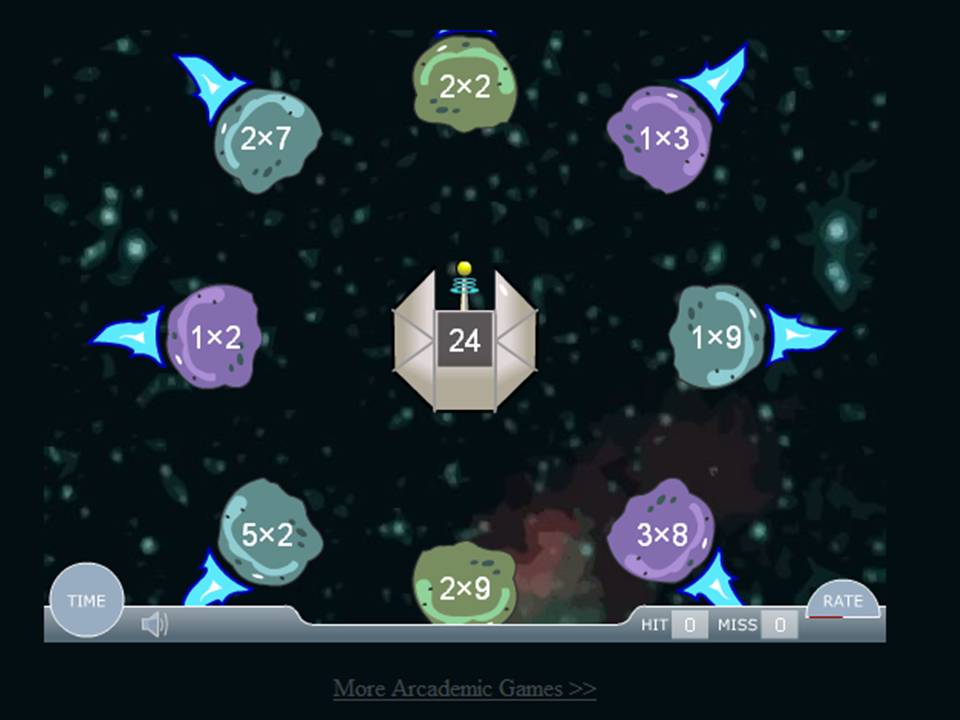 I will give one example for each activity. For Fact Families we got 12 - so one was 12 x 1. We get it again so it is 6 x 2. For multiples we get a 7 - so it was 7, 14, 21, 28, and 35 (we had them go up 5 multiples). For Factors we got 15 - so whe had 1, 3, 5, and 15. For Prime Factorization we got 24 - so it was 6 x 4 which gets broken down to 2 x 3 and 2 x 2. The final answer would be 3 x 2 cubed. All of this went pretty well. Plus, we had several students who were able to do the math including one of our star Math students who got through 27 problems in 1 minute (the fastest in the class by far).
So, Chris decides to add one more activity into the mix, Exponents. This one was where we hit a bit of a wall with the students. Several students had a hard time with the idea that you have to multiply the number however many times the exponent says. Many of them wanted to just multiple the number by the exponent. So after a little pause of play we went around and made sure that everyone was on the same page. We went through a few examples on the board (6 squared, 4 cubed, etc) and then had them do the rest at their seats. All in all I believe it went well.
Just some ending notes. Again I heard some "This is easy" during the Math problems and "don't die!" and "it's that one right there!" from the students while their classmates were trying to find the correct meteor to take out. The only vocab we had to review was Prime and most remembered what it was. We gave the students a fair amount of praise and they still seemed to enjoy working the problems.
Sunday, April 25, 2010
Wii, day 7 - setting up the wireless information
 It has been a while since we used the Wii in the classroom. With our short week from Spring Break and then the Spring festival we had, there just hasn't been much time to get it all together. So, this week Chris and I worked at getting back into the swing of things. During Spring Break, I was able to get the wireless access points (Cisco 1000 series - older models which are end of life, but still work great) up and running throughout the school. So, what's the first thing that I need to do with them? Well, get the Wii up and running on the Internet of course! As with everything in technology, it should have been a cake walk. Just double click on the wireless adapter, auto find the SSID, put in the password (of course there is a password!) and cruise the web. And as with everything in technology, it just didn't work out that way! Here is a page with directions from Nintendo for setting up a wireless connection(BTW, the Nintendo site is a pretty good one with info on errors and pictures/videos to help with the install). I wasn't able to just double click and go for whatever reason. When I did a scan for the SSID, the console would see it and give me the correct security settings. However, when I tried to put in the correct password I would not be able to get on the web. It kept coming up with different error codes that had to do with wireless connection problems. So, after some conversations with a friend who is very knowledgeable with Cisco equipment (thanks Chuck!) we wound up creating another wireless SSID that didn't have the same level of security. I turned off the broadcast feature and created all the settings manually. If you click on the Manual Setup button (shown here) you can enter in all the settings.
 From here you add the SSID (again, I turned off the broadcast so I had to add it manually).
Then choose the type of security and put in the encryption password.
 From here we manually put in the IP address and DNS address (if you don't know what these are you should be able to ask the tech person at your school).


The last setting is the easiest. Don't change it! Just leave it set at 0 and hit save.

At this point I was able to run the connection test and see it hit the Access Point. In just a few seconds I was talking on the Internet. The first thing the console wants to do is download the latest firmware from the web. You get the warning that if you have modified the console any that it may become unusable when the upgrade occurs (at least it gives you a warning/reminder). We did the upgrade at that point and it seemed to be steady connection and it worked the following day when we were playing a game. The next thing that we did was download the Internet browser for the Wii. Here is a page on specifically how to do this but I will give the highlights.
One thing, we did occasionally lose the connection for a second or two. I hope that this is just because the wireless lost signal (some kind of interference) for a moment. It did come right back but I did have to reset the game settings once it lost the wireless so it is a inconvenience, but certainly not a deal breaker. I think the reset was just because I was on a web page through the browser. If I had been playing a game I don't think there would have been the same reset problems...
 From here we manually put in the IP address and DNS address (if you don't know what these are you should be able to ask the tech person at your school).

The last setting is the easiest. Don't change it! Just leave it set at 0 and hit save.

At this point I was able to run the connection test and see it hit the Access Point. In just a few seconds I was talking on the Internet. The first thing the console wants to do is download the latest firmware from the web. You get the warning that if you have modified the console any that it may become unusable when the upgrade occurs (at least it gives you a warning/reminder). We did the upgrade at that point and it seemed to be steady connection and it worked the following day when we were playing a game. The next thing that we did was download the Internet browser for the Wii. Here is a page on specifically how to do this but I will give the highlights.
- Select the Wii Shop Channel from the Wii Menu. If you have not previously accessed the Wii Shop Channel, you will need to read and agree to the User Agreement.
- Once the welcome screen is displayed, select "Start Shopping."
- Select "Wii Channels" from the Wii Shop main menu, then select "Internet Channel." Select "Yes" if you agree to the amount and to confirm the download. THERE IS NO COST to download the browser.
- After the Opera Browser finishes downloading, the "Internet Channel" will be added to your Wii Menu.
One thing, we did occasionally lose the connection for a second or two. I hope that this is just because the wireless lost signal (some kind of interference) for a moment. It did come right back but I did have to reset the game settings once it lost the wireless so it is a inconvenience, but certainly not a deal breaker. I think the reset was just because I was on a web page through the browser. If I had been playing a game I don't think there would have been the same reset problems...
Wednesday, March 31, 2010
Wii - Day 6

Today we finished up with the same game that we used the last time we pulled out the Wii, Internal Clock. We wanted to make sure that all of the students who didn't get a chance to play last time (we just ran out of time) were all able to have a remote and try to keep time in their heads. Before we began Chris orally went over what we did last time and had the students answer questions about what operation we were using (subtraction) what the difference was between the negative and positive numbers, and seconds and milliseconds vocabulary. We brought the students up again 4 at a time and had them use the same people that were created last week (all of that same work was already there from the last time we created them all). This time we decided to concentrate on the 2nd of the 4 rounds that the game plays. During the 2nd round each of the 4 players have a different time they are trying to get the closest to so it means 4 different math problems. We put the students name on the board and put the times they were trying to hit and had all of the students write down the same info in their Math copybooks. Then the 4 began playing. At the second round we had this:
Player - Total time - Time recorded
1 16 18:18 2:18 over
2 21 25:81 4:81 over
3 22 30:78 8:78 over
4 20 20:80 :80 over
After the times were posted on the board, Chris asked the questions - Was anybody under time? Was anybody over time? Would that be positive or negative numbers? Who came the closest to the time they were trying to hit? Then the students all had to do the Math problems and tell us how far over they each were from the target time. After we checked a few answers the students were able to finish round 3 and 4 and declare a winner for that group. We switched the group of 4 and began again.
The procedure was the same, but this time the results and the questions we asked were a little different:
Player - Total time - Time recorded
1 16 15.81 .19 under (-)
2 18 18.96 .96 over (+)
3 23 17.15 5.85 under (-)
4 15 17.51 2.51 over(+)
Again, we asked the same questions but added the directions to now put the recorded time in order to closest to target time to furthest away from target time (not making a difference for positive or negative numbers).
Then we asked the students to put the results in order from least to greatest. Now they had to take the negative and positive numbers into account when they placed it in order. This was a bit of a review from the last game we played with them on Big Brain Academy which was popping the balloons in order from least to greatest. Again, we checked a few and moved on to let the students finish the game. We switched out the kids two more times having them take down the numbers for the 2nd round each time and doing the Math. We made only one slight change during the last round which was a bit of a bump in the road. During the last round Chris asked the students to order the numbers not from least to greatest, but from greatest to least. We had 4 different students who said it was harder for them to group them that way then it was to group from least to greatest. After we went around and made sure that we were all together we let the students finish up the round and then have the last groups go. We worked out the Math problems and answered the questions after the 2nd round again. By the time we were finished each of the students had played the game (either this week or last) and they all had at least 15 math problems completed.
A few notes:
1. In an effort to give all the information, today was the first day of our Spring Break. We did have school, but it was only a half day - students out at Noon. So, the group was a little more wound up then usual. Not a surprise for anybody who works with students! All in all they did a good job working the Math problems, but it did take a couple of reminders from Chris that all of the students should be doing the Math work at their desk, not just the people that were playing.
2. We asked the students why they thought it was more difficult to go from greatest to least instead of least to greatest and while we didn't really get a complete answer, a couple of students just said it was easier to start with the negative numbers and move up to the positive ones...
3. One or two of the students made the observation that if you were having a problem with the greatest to least ordering, just do least to greatest and reverse it. This helped some of the confused students, but not all.
In future posts, I will make an effort to see if we can get some screen shots of the games and the math problems that we are completing during the process!
Sunday, March 21, 2010
Wii - Day 5

This week Chris and I continued to work off of last week's negative number work with the Wii. On Friday we worked with another game called 30 Great Games Outdoor Fun for the Wii. And yes, while the reviews are not that favorable it did have some redeeming qualities for the classroom. The benchmark we were covering this week was MA.5.A.2.3 - Describe real-world situations using positive and negative integers. The game that we used was called Internal Clock 2. Basically, each person gets a time
 that they have to count up to. The clock begins counting but after about 5 seconds it goes off and you have to continue to count in your head. When you think you are at the time you push the button. The person closest to the time wins that round. The time is presented in decimal format as seconds, with both tenths and hundredths of seconds. Maybe not the most exciting game around, but the students did like to be able to be faster than the others (and we actually had one student who hit the time dead on). What we did was have them subtract their time from the requested time. The students that hit the button quicker than the requested time were in the NEGATIVE because they were slower than the timer - they still had the amount of time left to get to the correct time. The ones that were over the requested time had to subtract their number from the requested time and they were in the POSITIVE because they were longer than the requested time - they held on too long. For example, during the first round, the student all have to hit the button at 11 seconds. The results were:
- 10.90
- 12.45
- 11.73
- 11.18
- -.10
- 1.45
- .73
- .18
Just a couple of pointers:
- We created the character the day before we played in the room - this game doesn't use the Mii's so they have to be created and named ahead of time. There are only limited options for looks. Also, there is one girl who could be considered a little inappropriately dressed (has a low cut shirt on).
- We found that the students sitting watching the others actually playing started trying to distract the players by yelling out numbers (while the players were trying to count to their number) so we had to nip that in the bud quickly.
- We asked the students for other real world situations where negative numbers could be a factor and we got money issues and (with some help from another adult also in the room) sea level.
Sunday, March 14, 2010
Wii - Day 4

Today our lesson on the Wii was on negative numbers. The specific standard that we were targeting was MA.5.A.2.4 - Compare and order integers, including integers shown on a number line. Chris and I gave a pre-test to the 5th grade students before-hand because it is a concept that they don't have any experience in. The test was simply to put a set of numbers in order from highest to lowest. We had a total of 4 students who were able to get the sequences correct (on a side note, we used Google Forms to create the test). From there, we did an introduction of negative numbers and how they run away from the zero point on a number line. How, even though the number is bigger, it is actually smaller in value. To emphasis this point, we used the Wii game Brain Age - more specifically the game Balloon Burst. The point of the game is to burst the balloons by clicking on them with the controller. You want to click on the balloons in order from smallest to biggest.
 If you choose the hardest level, the numbers will come in both positive and negative forms. As you can see from the picture, the balloons are all different sizes and colors and they even will move around (rotate) on the screen. We gave each student a chance to come around and pop the balloons in order from lowest to highest. While the student was popping at the board, the students at their seats were all writing the numbers down and putting them in order as well. Chris and I went around the room to check their seat work and make sure that they were working on the math. Everything went well.
Later that day we gave the students the same test as a post-test. We went from 4 students get them correct to all students passing and 18 of them that receiving a perfect score. Very exciting results. The other thing that is nice about the lesson is that this concept is not one that we normally get to in the classroom setting (due to other Math issues that we are working on). So, in one class period we were able to not spend a lot of time but cover a topic that doesn't normally get covered in our 5th grade class, all thanks to the Wii!
Saturday, February 27, 2010
Wii - Day 3

So yesterday (Friday) Chris and I did another round of Wii in the classroom. This time we used the baseball game (in Wii Sports) to review averaging. It is actually the training portion of Wii Sports, not the game itself. The pitcher throws 10 pitches and the computer will add up the total of all the home runs hit at the conclusion. If you don't hit a home run then you don't get any distance added in. But, it is always 10 pitches.
First Chris did a quick review of what averaging was and how to get an average (did this orally). Once she had the concept reviewed we brought each student up to get a swing. If they hit a home run then she marked down the distance on the board and the students each did it on their papers. If they didn't get a home run then we marked nothing. After each hit the student would pause the game so the next student could come on and take a swing. At the end of 10 swings we have a total (the game gives it to you so the students could check their addition on their papers) distance hit and we averaged that by the number of home run hits to get an average. Then the teacher did the math on the board to have students check their average work. We played 4 rounds which was enough to let each student get to bat twice. As before they were interested and excited about getting to play.
Some Notes:
1. The students really like the music. When we put the overhead speakers on you should see them all start bobbing their heads up and down. They can keep the beat and some of them even hum/sing along with the tune (just a music beat).
2. The hardest part for the students was remembering to hit the pause button after each swing! Especially if they hit a home run, they were too busy jumping up and down or giving their neighbor a high-five to remember! :-)
3. We were able to reinforce the idea of a repeating decimal (instead of a remainder) when the average didn't come to a whole number.
4. One student realized that he was able to do the math quickly in his head just by moving the decimal place over 1 spot since we were always dividing by 10.
5. Interesting to see some of the students timing when the ball is pitched. Some are right on, but some have very poor hand-eye coordination. Of course, this would probably improve with more practice with the console.
6. We are still using guest Mii's to play. That means none of the scores or information gets saved. We will have to begin to have the students make their own Mii's to play some of the other games. We are also going to need to make a Class Mii for when we are playing these whole class events (that way 1 student's Mii doesn't get an unfair advantage -either positive or negative -from all the others)!
Tuesday, February 9, 2010
Nintendo Wii - Day 2

Well, the 5th grade teacher (her name is Chris) pulled out the Wii today for the first time. We just did a little practice with the students so they could see it in the room and in action. One of the games that was purchased was "Are you Smarter than a 5th Grader?" (based on the TV show showing on Fox). One of the options is called Flashcards where the players (we used 4 different students) have a question and then get 4 choices. Each of the questions is worth a different amount of money depending on the grade level. If the student gets the question wrong they lose half of that amount. If they get it correct they get the full amount and if they are the first one to answer the question correctly, they get bonus money (which appears to be an extra 20% - although I am not certain about the exact amount). We had all of the students who did not have a controller writing down their answers on paper at their desks. So, it should have been a review for all students and we had several do well. We only had time enough to play two rounds (involve 8 students) but all in all I think the first installment of the console went well.
We have decided to create a full lesson plan on using the Wii Golf game (in the including Sports disk) focusing on averaging scores. The students will have the distance to the hole divided by the number of strokes to get the ball in the hole to figure out their average distance. We will use all four controllers and rotate the students around for each hit until they put it in the hole. The math problems should be different since, while the hole distance won't change for any of the four players, how many strokes it takes to put it in will (or at least has the opportunity to change). We are planning a pre-test and post test to see what kind of results we can record. Leave a comment and wish us luck!
Monday, February 8, 2010
Using the Wii in education Day 1

I am working with the 5th grade teacher in my school to begin a new project. We are going to begin using the Nintendo Wii as a way to help with our test scores. While there are lots of learning potentials, and we will use the console with different games and for different purposes, our first focus is on Math. We have been following a teacher named Tom Barrett who has been using the Wii in his classroom for a while now with success. So, we brought in a console from home and followed Tom's lead using Wii Golf for subtraction practice. We were met with interested students and engaged learners who practiced their three digit subtraction for 45 minutes! We have decided to try and build on this interest and begin some kind of research study using the Wii.
The program has officially begun today in that we purchased equipment. More specifically, the 5th grade teacher had a birthday and she got the Wii along with controllers, wheels, batteries, games, and necessary equipment to use the console in the classroom. I have already hooked up the machine in the classroom and we are going to begin the background research necessary and keep a running journal of what we do and when we do it. So, hence our title - Day 1 with the Wii.
Picture link
Subscribe to:
Posts (Atom)


