Monday, October 31, 2011

4th grade Subtraction, class 1


Let me begin by saying that since this is my first post about using the Wii in the new school this post may be a little longer winded than usual. There are a couple of different things about my new school. First of all, there are more kids (almost 3 times as many). So, we have two classes of every grade. Our 4th grade is the class that we chose to begin the Wii project with. Half of the class has Math in the morning (first period), and the other half is in the afternoon (after lunch). Nicole and I had obviously already decided what we were going to play and discuss how she would keep track of classroom management. We decided to begin with Wii Resort Golf (the Resort game came with the Wii so no cost involved with another game yet). We were going to play 3 holes on course A. The course doesn't really matter, and there are 3 to choose from so the students can have different views and starting yardages at least a few times. (Of course, even if they play the same course each time will have different yardage because each hit will be a different distance.) The option for holes is 3, 9 or a full 18 so we decided that 3 would be the way to go.


So, I went in first thing and set up the Wii in the classroom. We have the projectors hooked up via video cable and audio goes directly into a radio via an input cable. I just hooked up the Wii using the included cables (again, no real cost involved). When the students came in we had the system up and ready to go at the intro Wii page. As soon as they walked in most of the students recognized the music and asked about playing the Wii (we had told them that we were going to play it earlier so it wasn't a complete surprise or anything). Nicole had each student get out paper and pencil and take their seats. There was a lot of excitement and even a few Ohhs and Ahhs as we got into the setup for the game. Nicole had all the students put their names on their papers and number them first through 10 (we will need more numbers than that). The yardage to the first hole was 396 yards so we had all the students write down that first number as problem number 1. We gave the controller to our first student (for this time we just started in the front and rent in row order) and had him swing away. After he hit all the students put the distance left to the hole (which is what the computer tells you) and they figured out how far he had hit the ball! This went on two more times until we hit our first snag. The student hit it on the green which changed the distance from yards to feet. At his time the 4th graders do not know how to convert from yards to feet (or vice versa) so we just skipped this problem and went on to the next (since this post Nicole has done a lesson on conversion so this problem has been solved). Our next problem came in with decimal subtraction and addition. Once you are on the green it gives you the distance to the tenths place. Again, the 4th graders didn't have much experience with lining up the decimal places so that took some time to show (Nicole did it right there during the lesson). They understood the idea of lining up the decimal points and doing the operation well enough. Then we came to our third different thing (not really a problem, just something different) of the class. The next person hit the ball and went beyond the cup which makes a new math problem. She had 43.2 feet to go to the cup, but she hit it beyond the cup 18.3 feet (she really got a hold of the club!) so, how far did she hit the ball. We asked the students to decide what operation we were going to need to do; and, after a little prodding, we got the correct answer of addition. Again, not a problem, but a different task at hand. We had enough time for everybody to hit and since there was still a few minutes left in class they wanted the teachers to hit. Both Nicole, myself, and the 4th grade homeroom teacher (who joins the class for Math) had a turn. The students were all very excited when we hit the ball (we wound up putting it in the cup). At the end of class Nicole collected all of the student's sheets so she could go over them.

All in all, everything went well. The students seemed to get what was going on and all worked on math for the entire class period. I heard some good comments, my favorite being "This is the funnest math class ever!"
pictures from nintendo.com website Last picture copy of student's work collected at end of class

Sunday, September 18, 2011

New year, New school, Same ideas

So, I have been gone from the blog for several months. What in the world have I been doing? Sometimes I ask myself that very question. This time I have an answer. I have moved to another school (in my same area) and I have a different role in this school. I am still the Tech Coordinator, but have a lot more technology to coordinate. It is a bigger school (almost 500 students) and they have about 200 computers. So, I remain busy trying to make sure that all my teachers are using technology to the best of their ability. I do miss my old school and staff, but lucky for me I still get to keep in touch with them often and Chris and I are still talking about all different aspects of teaching and tech.

Speaking of Chris and I, we were chosen to present at the annual FETC (Florida Educational Technology Conference) this January! We are excited. Our topic? Using a popular gaming system in your classroom. i.e. - The WII! If you are going to be in Orlando at the end of January for the conference, please come check us out! You can find out more information about the FETC by visiting the website - www.fetc.org


So, you may be wondering, with this presentation opportunity, are you going to be able to bring the Wii and your research into the new school? Well, wonder no more, the answer is yes! I was lucky enough to hook up with another teacher who is interested in the idea of using games to teach content in the classroom! Her name is Nicole and she is the math teacher for our 4th-6th grade classes. I was talking to her about some of the things that Chris and I had done in the previous school and I could see that she was interested. We brought the idea to administration and got our principal's blessing. With that vote of confidence Nicole and I started talking about how we can use the Wii in the classroom!
Problem 1, get a Wii!
But wait! As I was crawling around on the floor of one of our coaches/athletic director's office, following a Cat 5 cable, (a postition that any tech person is very familiar with) what did I come across? A brand new Wii! Still in the box! One of the parents had donated it to the coach for athletics (they use it with the Dance Dance games and other move oriented activities throughout the year - note to self make sure to add that game opportunity to list of uses for Wii in school). "Do you mind if we borrow the Wii to use in the classroom?" I asked. "Of course you can use it" she said! Problem 1 out of the way!
Problem 2, hook it up.
The classroom has a projector hanging from the roof, pointing to a interactive board. I was able to get a video/audio splitter and hook the Wii right into the feed going to the projector. The classroom has speakers so the audio goes into there. Bam! 77 inches of Wii goodness booming out of 100 watts of dolby power. Problem 2, in the bag!
Problem 3, what software will we use?
But wait! I still have the work that Chris and I did with our 5th graders when we started this whole thing 2 years ago! We will turn our focus back to Mathmatics and concentrate on programs that worked. We can use Wii Sports and Brain Age for starters. We can focus on subtraction, addition, averages, ratios and integers (both negative and positive). Nicole and I have also begun discussing using other software packages (more posts about those later) as we branch out in the class. Problem 3, piece of cake!
Problem 4 - which class will we use?
After some discussion, Nicole decided (and I agreed) that we would start with 4th grade and go from there. Because I have already worked with 5th graders I was excited to be moving to a different grade to see how things worked. We will have some issues with them not being as well versed in the standards such as conversion from yards to feet but that is the exciting part! Problem 4 - No Problem!
Problem 5 - when do we start?
As you will see, we have already started! I have been lax in my posting (insert many excuses here) of what we have been doing, but that will all change now! As of this posting we have already used the software 5 times, (4 times with 4th grade and 1 time with 6th grade), and had good results. I will work at getting my notes and thoughts posted here during this week for anyone that is interested. Nicole and I have already been planing ahead for other Math lessons and other software packages. All in all I couldn't be happier with the new information that we have been able to gather. Please keep watching for new posts and new ideas for using the Wii! I am sure that new problems will arise to keep us on our toes...

Tuesday, July 5, 2011

ISTE infographics


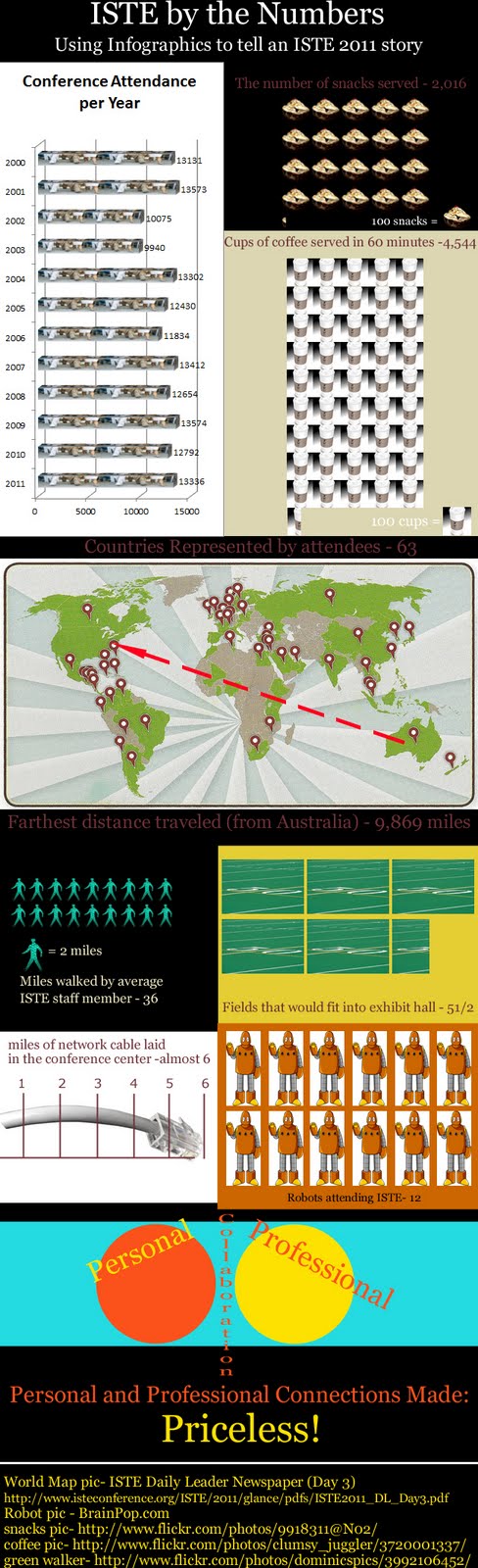
So, I was lucky enough to be able to spend last week at the 2011 ISTE conference in Philadelphia. I, like most everyone else that was there, enjoyed running around looking at all the different aspects of the conference. One of the sessions I went to was about Infographics. Basically, infographs are a way to show numbers or details in a graphic nature. Any graph can be considered an infographic; but; they are usually much more involved than that. The picture on the left is my first shot at creating an infographic using numbers from ISTE 2011. The infographic has been updated to show the latest numbers put out from ISTE. You can click on the picture to see it larger or...

This link is to a site called zoom.it which allows you to zoom into any picture. It will allow you to zoom in and out of the infographic, as well as move around the picture, in more detail. So, on top of the infographic, you get a cool website as well - wow, 2 for the price of 1!

Sunday, June 19, 2011

Digital Textbooks - a thing of the present?


Here is an interesting article about digital textbooks. Apparently, Florida has passed a law "requiring all public schools to adopt digital textbooks by the 2015-16 school year and spend 50 percent of their textbook budgets on digital materials". Needless to say, the districts are not jumping for joy at the plan to spend all that money in the midst of budget cuts and crunches! The savings are not going to be apparent up front (are they ever), and who knows how many challenges there will be to the law in the next 3 years (anybody forgotten the class size fiasco?). There are a few examples of digital textbooks working in high schools (the Kindle was highlighted in the article) and it looks like there may be more to come.

The most interesting thing that MAY keep this plan alive is one fact written towards the end of the article - FCAT and end-of-course exams, will go digital by 2015 and they don't want the first time the students see digital content to be on the test that grades the schools!

Planning Instruction using the Video Game Model

Here is a great article that I just found via Twitter. The article was originally published in Edutopia back at the end of May and was written by a woman named Dr. Judy Willis. While it isn't about video games per-say, it does talk about planning instruction in the same fashion as a video game (something all of the students have at least some level of experience at). "The computer game model correlates to using achievable, incremental, challenge, with goal-progress recognition." I agree with Dr. Willis that this manner of instruction could certainly bring about an individualized attack to each child's school work. Check out the article and please post a response or a comment!

Thursday, June 16, 2011

Video Games Power Up Learning

"Videogames are emerging as a new gold standard of learning because they effectively integrate many vital learning principles into their design."
This is a sentence that comes from Tina Barseghian in an KQED.org article she wrote titled "Five Reasons Why Video Games Power Up Learning". You can read the whole article, and the five reasons, by clicking here.
I hope that all of the popular gaming companies get forwarded this article and will improve their R & D in the area of educational games!

Monday, February 7, 2011

Web 2.0 tools for inservice

www.edmodo.com – collaborating tool (more for staff then students)

www.blogger.com – Google Blog page (more for staff then students)

www.classblogmeister.com – Blog site (teacher can control)

www.kidblog.org – Blog site (teacher can control)

www.glogster.com – create an online poster

www.bighugelabs.com – lots of tools to create posters, cards, letters etc

www.voicethread.com – a visual collaboration tool

www.wordle.net – visual way to lay out words

www.tagxedo.com – a wordle in the shape of a picture

www.storyjumper.com – create a book online

www.blabberize.com – make any picture “talk”

www.voki.com – create your own online person

www.kerpoof.com – multiple options include card & picture making, video making

www.animoto.com – create a video using your pictures and their music

www.photopeach.com – create a video using your pictures and their music

www.jogtheweb.com – put any number of sites along with instructions or helpful hints - one of my favorites!

www.delicious.com – online bookmarks (more for the staff then students)

http://metaatem.net/words/ (spell with flickr javascript program)

www.evernote.com – copy info from multiple online sources and keep it all in one place

www.dropbox.com – have copies of files on multiple computers

www.easybib.com – be able to create a bibliography with multiple sources

www.audacity.com – voice recorder program for podcasts

iTunes podcasts and iTunes University – professional development (more for staff then students)